 Iktiup Mahmud
· 4 min read
GitOps on Kubernetes with Argo CD and Helm
Stop running kubectl apply from laptops. How to make git the single source of truth for your cluster - repo layout, Helm values per environment, Argo CD, CI image bumps, secrets and rollbacks.
- #kubernetes
- #argocd
- #helm
- #gitops
- #devops
Most Kubernetes clusters start the same way: someone runs kubectl apply or helm upgrade from their laptop. It works - until nobody remembers which version is running, a hotfix applied by hand gets overwritten, and "what changed?" has no answer.
GitOps fixes that with one rule: the desired state of the cluster lives in git, and an agent in the cluster makes reality match it. You don't push to the cluster; you push to git, and the cluster pulls.
The benefits are practical:
- Every change is a commit - reviewed, auditable, with an author and a reason.
- Rollback is
git revert. - Drift is detected and fixed - manual changes in the cluster get reverted automatically.
- CI never needs cluster credentials - it only writes to git.
The flow
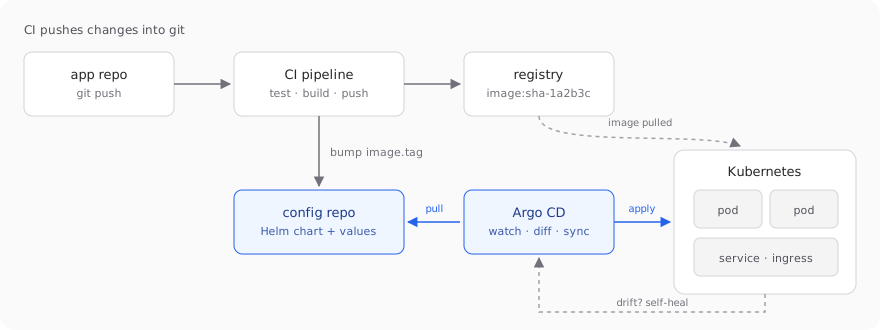 CI builds images and bumps a tag in git; Argo CD pulls the change and applies it
- A developer pushes code to the app repo.
- CI runs tests, builds an image tagged with the commit SHA, and pushes it to the registry.
- CI then updates the image tag in the config repo (a one-line commit).
- Argo CD notices the config repo changed, renders the Helm chart, and applies the diff to the cluster.
1. Repository layout
I keep application code and deployment config in separate repositories. Config changes then have their own history and permissions, and a CI commit bumping a tag doesn't trigger another app build.
deploy/
├── apps/
│   ├── orders-api-staging.yaml   # Argo CD Application
│   └── orders-api-prod.yaml
└── charts/
    └── orders-api/
        ├── Chart.yaml
        ├── templates/
        │   ├── deployment.yaml
        │   ├── service.yaml
        │   └── ingress.yaml
        ├── values.yaml           # shared defaults
        ├── values-staging.yaml
        └── values-prod.yaml
The chart is written once. Environments differ only in their values files:
replicaCount: 3

image:
  repository: ghcr.io/acme/orders-api
  tag: sha-1a2b3c4

resources:
  requests: { cpu: 250m, memory: 256Mi }
  limits: { memory: 512Mi }

ingress:
  host: api.example.com
Always deploy immutable tags like the commit SHA. With latest, git no longer tells you what's running, and rollbacks become guesswork.
2. Install Argo CD
kubectl create namespace argocd
kubectl apply -n argocd -f https://raw.githubusercontent.com/argoproj/argo-cd/stable/manifests/install.yaml

# initial admin password
argocd admin initial-password -n argocd
Expose the UI through your ingress (or kubectl port-forward svc/argocd-server -n argocd 8080:443 to start), log in, and change the password.
3. Describe the app
An Argo CD Application says: "take this path from this repo, render it with these values, and keep it deployed in this namespace".
apiVersion: argoproj.io/v1alpha1
kind: Application
metadata:
  name: orders-api-prod
  namespace: argocd
spec:
  project: default
  source:
    repoURL: https://github.com/acme/deploy.git
    targetRevision: main
    path: charts/orders-api
    helm:
      valueFiles:
        - values.yaml
        - values-prod.yaml
  destination:
    server: https://kubernetes.default.svc
    namespace: orders
  syncPolicy:
    automated:
      prune: true
      selfHeal: true
    syncOptions:
- CreateNamespace=trueautomated- apply changes as soon as they land in git.prune- delete resources that were removed from git.selfHeal- revert manual changes made directly in the cluster.
Apply it once with kubectl apply -f apps/orders-api-prod.yaml. From now on, git drives.
Once you have more than a few apps, use the app-of-apps pattern: one root Application that points at the apps/ folder, so adding a new service is just adding a file. ApplicationSets go further and generate Applications from a template - for example, one per environment or per cluster.
4. Let CI bump the tag
At the end of the build job in the app repo, commit the new tag to the config repo. With GitHub Actions and yq:
- name: Bump image tag
  env:
    TAG: sha-${{ github.sha }}
  run: |
    git clone https://x-access-token:${{ secrets.DEPLOY_REPO_TOKEN }}@github.com/acme/deploy.git
    cd deploy
    yq -i ".image.tag = \"$TAG\"" charts/orders-api/values-staging.yaml
    git config user.name "ci-bot"
    git config user.email "ci-bot@users.noreply.github.com"
    git commit -am "orders-api: deploy $TAG to staging"
    git push
For production, open a pull request instead of pushing directly. Promotion to prod becomes a reviewed, one-line PR that copies the tag from staging.
If you'd rather not write to git from CI, Argo CD Image Updater can watch the registry and update tags for you. I prefer the explicit commit: it's easier to follow.
5. Secrets: never plain text in git
Everything is in git - except secrets. Options that keep the GitOps model:
- Sealed Secrets - encrypt with the cluster's public key; only the controller in the cluster can decrypt. Safe to commit.
- External Secrets Operator - commit a reference, and the operator fetches the value from AWS Secrets Manager, Vault, Doppler or similar.
- SOPS - encrypt values files with a KMS or age key; decrypt at render time via a plugin.
For teams already on a cloud provider, External Secrets is the one I'd pick: secrets stay in the provider's vault, with its rotation and audit logs.
6. Rollbacks and day-two operations
- Roll back with
git reverton the tag bump. Argo CD syncs the previous version. The Argo CD UI has a rollback button too, but it's disabled while auto-sync is on - by design, git stays the source of truth. - Health checks - Argo CD understands Deployments, StatefulSets and Ingresses, and shows an app as Degraded when pods crash-loop. Pair it with readiness probes so a bad version never receives traffic.
- Sync waves - use the
argocd.argoproj.io/sync-waveannotation to order resources, for example running a database migration Job before the new Deployment. - Notifications - Argo CD Notifications can post sync results and failures to Slack.
Summary
- Git is the source of truth; Argo CD pulls and reconciles.
- One Helm chart, one values file per environment, immutable image tags.
- CI builds and bumps a tag - it never touches the cluster.
prune+selfHealkeep the cluster honest.- Secrets via Sealed Secrets, External Secrets or SOPS - never plain text.
- Rollback is a
git revert.